
I will start with an example: say you have a page table with 2 columns. You want to check, in your UI testing, that the values in the second column are the expected ones. By looking at the table you see that the first 2 and the last 5 values are the same. You have to iterate the table values to compare to the expected ones, but what is the simplest way to do this? You could use 2 for loops to check for those identical values, but you would just be repeating the code inside those for loops, as you would be writing the exact same checks. Even if it’s calling a separate method, it would still be a code repeat. Let me exemplify solving this situation using ‘chained’ for loops.
Let’s first take a look at the table for a better visual understanding:
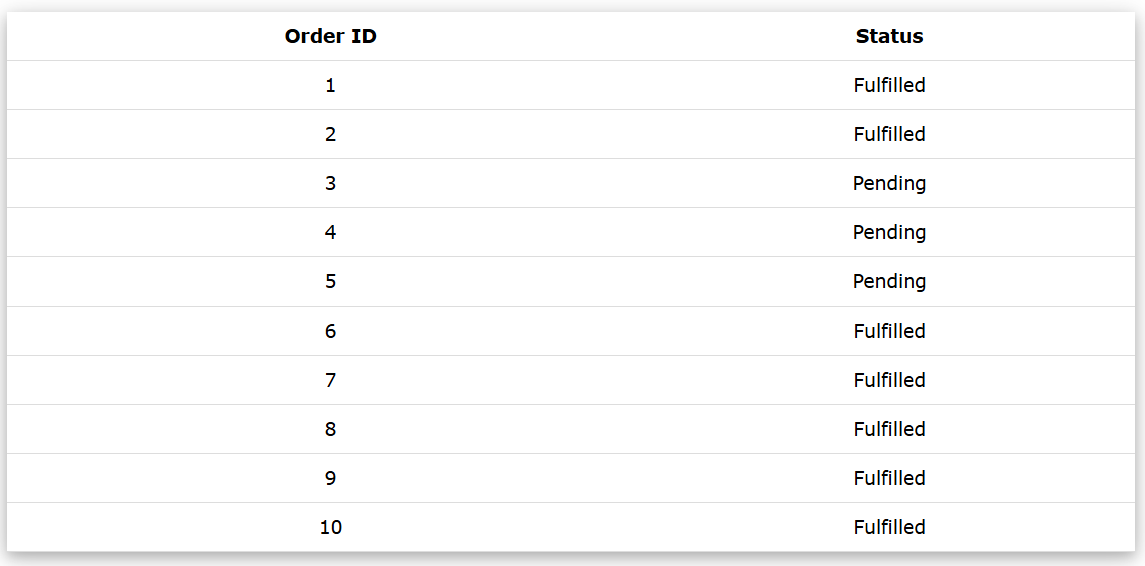
So in this case, there is a list of hypothetical orders a customer has placed. In the first column there is an order id, which is in this case a number. The second column holds the status of the order. The purpose here is to check that the ‘Fulfilled’ orders are the ones with id: 1, 2, 6, 7, 8, 9, 10.
Now, the HTML code behind that table is:
<table>
  <thead>
    <tr>
      <th>Order ID</th>
      <th>Status</th>
    </tr>
  </thead>
  <tbody>
    <tr><td>1</td><td>Fulfilled</td></tr>
    <tr><td>2</td><td>Fulfilled</td></tr>
    <tr><td>3</td><td>Pending</td></tr>
    <tr><td>4</td><td>Pending</td></tr>
    <tr><td>5</td><td>Pending</td></tr>
    <tr><td>6</td><td>Fulfilled</td></tr>
    <tr><td>7</td><td>Fulfilled</td></tr>
    <tr><td>8</td><td>Fulfilled</td></tr>
    <tr><td>9</td><td>Fulfilled</td></tr>
    <tr><td>10</td><td>Fulfilled</td></tr>
  </tbody>
</table>
By inspecting the code, we can see that we have an HTML table element, with rows depicted by the ‘tr’ tags and columns represented by ‘td’ tags.
In our case, the first row in the table is just the header so we can omit any checks for it, as we are only interested in the ‘status’ values.
I will demonstrate how to write this test by using Selenium with Python. The first thing i will do is extract the rows as WebElements into a list as follows:
rows = driver.find_elements(By.CSS_SELECTOR, 'tr')
Now, if i were interested only in rows 6 to 10, i would write the for loop declaration as follows:
for i in range(6,11):
I would then extract the columns for each of the rows as follows (by splitting the row into the 2 ‘td’ elements, and storing both column information into a separate list variable):
current_columns = rows[i].find_elements(By.CSS_SELECTOR, 'td')
For the fun of it, i will add an extra assertion, to check that the id of the order is the expected one. In my case the id of the order actually equals the i value in the loop iterator:
assert int(current_columns[0].text) == i
Of course, as per the above, and as per the table, the first column (hence the first item in the list of column elements) represents the order id. Because Selenium extracts the text from the page in the browser as a string, but my iterator is an int, i converted the actual value from the screen to an int. This way i can assert the actual versus expected values.
To check the actual item of interest here, the order status, i would just compare the value stored in the second column (the second item in the current_columns list) to my expected status:
assert current_columns[1].text == 'Fulfilled'
And this would validate the last rows in the table. But i also need to add the same checks to the first rows. Ideally without duplicating any code from the for loop. Therefore, i will actually change the for loop declaration, to include the range(1,3), corresponding to the first rows, by using ‘chain’:
for i in chain(range(1,3), range(6,11)):
In a nutshell, this ‘joins’ 2 for loops: the one for the range(1,3) and the one for range(6,11) while executing the same set of checks for all these indexes. The resulting code all together is:
rows = driver.find_elements(By.CSS_SELECTOR, 'tr')
for i in chain(range(1,3), range(6,11)):
    current_columns = rows[i].find_elements(By.CSS_SELECTOR, 'td')
    assert int(current_columns[0].text) == i
    assert current_columns[1].text == 'Fulfilled'
Alternatively, you could do a ‘for i in [list_of_indexes]’, but this can be hard to manage at times, when you are interested in many indexes. And chain can be better when you have a great number of indexes grouped within ranges (e.g they are groups of consecutive indexes within a range).
Hope this helps. Thanks for reading.

 imalittletester